172PNN21022 Modbus Plus Adapter: Reliable Connectivity for Automation
Explore the Schneider 172PNN21022 Modbus Plus adapter module for Modicon Momentum. Learn specs, applications, and…
Read More
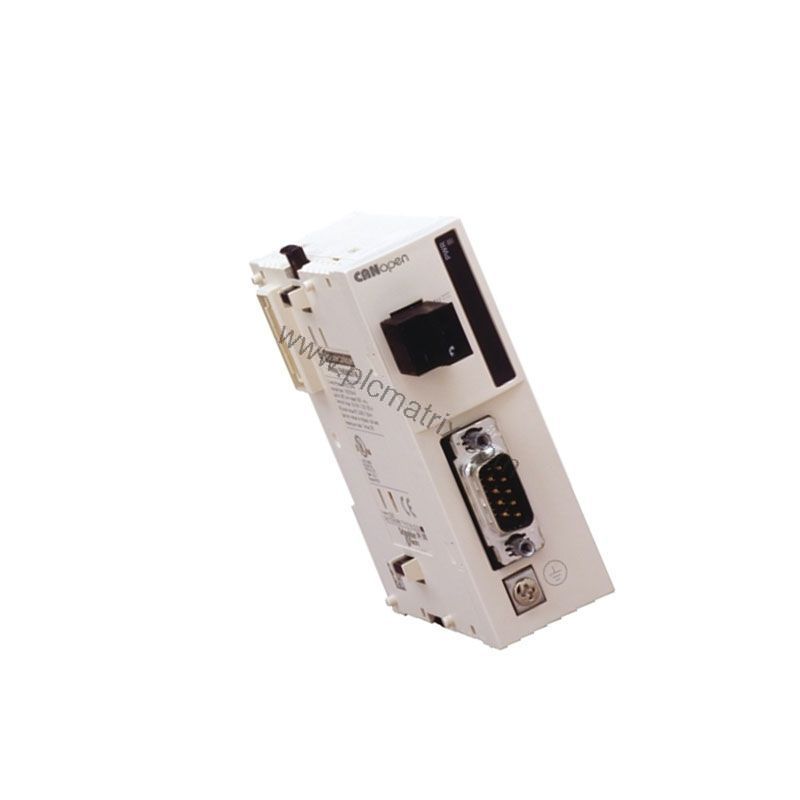
When your automation system demands reliable, high-speed communication between controllers and field devices, the Schneider TWDNCO1M CANopen bus master module delivers seamless integration. This module acts as the central coordinator for up to 16 slave devices, ensuring data flows efficiently across your Twido PLC network. Whether you are upgrading an existing line or building a new system, the TWDNCO1M provides the performance and compatibility you need.
The Schneider TWDNCO1M is a CANopen bus master module designed for the Twido programmable logic controller series. It connects via a male SUB-D 9-pin connector using two twisted shielded pairs, supporting the CANopen M10 DR 303-2 and DS 301 V4.02 protocols. This module enables your Twido controller to communicate with a wide range of CANopen-compatible drives, sensors, and actuators, simplifying system architecture and reducing wiring.
Current Consumption: 50 mA at 5 V DC, 50.5 mA at 24 V DC
Power Dissipation: 1.2 W at 24 V DC
Number of Channels: 16 RPDO and 16 TPDO
Number of Slaves: Up to 16
Status LED: 1 LED for PWR (power)
IP Degree of Protection: IP20
Operating Temperature: 32…131 °F (0…55 °C)
Storage Temperature: -13…158 °F (-25…70 °C)
Product Certifications: UL, CE
Weight: 5.47 oz (155.0 g)
These specifications ensure the TWDNCO1M operates reliably in industrial environments, with flexible baud rates to match your cable length and performance requirements.
Manufacturing facilities use the TWDNCO1M to coordinate motor drives and sensors on assembly lines. For example, a packaging line can employ this module to synchronize conveyors and labeling machines via CANopen, reducing downtime and improving throughput. In material handling systems, the module manages up to 16 slave nodes, enabling precise control of sorters and lifts. Its compact size and IP20 rating make it suitable for control cabinets in factories and warehouses.
Mount the TWDNCO1M on a DIN rail inside your control panel. Connect the 24 V DC power supply to the module terminals, observing polarity. Use a shielded twisted-pair cable with a male SUB-D 9 connector for the CANopen bus. Set the transmission rate via your Twido programming software to match your network length—125 kbit/s for longer distances or 500 kbit/s for shorter runs. Configure the module as the bus master and assign node IDs to each slave device. Verify communication using the PWR LED; a steady green light indicates normal operation.
Regularly inspect the SUB-D connector for secure mating and check the power supply voltage to ensure it stays within 24 V DC ± tolerance. Keep the module free of dust and moisture, as IP20 does not protect against liquid ingress. The TWDNCO1M dissipates only 1.2 W, so it generates minimal heat, but ensure adequate airflow in the cabinet. Following these simple steps maximizes uptime and extends service life, delivering strong ROI for your automation investment.
The TWDNCO1M is compatible with the following Twido base controllers: TWDLMDA20DRT, TWDLCAE40DRF, TWDLMDA20DTK, TWDLCDA40DRF, TWDLCAA40DRF, TWDLMDA40DUK, TWDLCAA24DRF, TWDLMDA40DTK, TWDLCDE40DRF, TWDLCDA24DRF, and TWDLMDA20DUK. It supports CANopen M10 DR 303-2 and DS 301 V4.02 standards, ensuring interoperability with standard CANopen devices. You can integrate up to one module per base controller, making it a straightforward addition to your existing Twido system.
Before ordering, confirm that your Twido controller model appears in the compatibility list above. Verify that your CANopen slave devices support the same transmission rates and protocol version. The TWDNCO1M requires an external 24 V DC supply; ensure your power source can deliver at least 50.5 mA at 24 V. BluePLC Industrial stocks this module and can provide current availability and lifecycle status. Contact our team for assistance with replacement options if needed.
| Model | TWDNCO1M |
|---|---|
| Brand | Schneider Electric |
| Stock Status | In Stock |
| Warranty | One Year |
The schneider-twdnco1m-canopen-bus-master-module-for-twido-plc offers processing performance suitable for its target application class. The exact scan time depends on program size and complexity.
The schneider-twdnco1m-canopen-bus-master-module-for-twido-plc includes onboard memory as specified in the technical specifications. Memory is available for program storage, data tables, and configuration.
The schneider-twdnco1m-canopen-bus-master-module-for-twido-plc is programmed using the manufacturer standard programming software. The software supports IEC 61131-3 programming languages.
The schneider-twdnco1m-canopen-bus-master-module-for-twido-plc includes built-in communication ports as detailed in the specifications. Typical ports include serial (RS-232/485), USB, and Ethernet.
The schneider-twdnco1m-canopen-bus-master-module-for-twido-plc is typically in stock and ships within 3-5 business days.
Interested in this product? Fill out the form below and we'll get back to you within 24 hours.
 In Stock
 In Stock
 In Stock
 In Stock
 In Stock
 In Stock
 In Stock
 In Stock

Explore the Schneider 172PNN21022 Modbus Plus adapter module for Modicon Momentum. Learn specs, applications, and…
Read More
Explore the Schneider Electric 172JNN21032 serial link adapter module for Modicon Momentum. Learn about its…
Read More
A comprehensive buyer's guide for the Allen-Bradley 1734-ADN POINT I/O DeviceNet Adapter Module, covering specifications,…
Read More
Explore the Schneider Electric 171CCC76010 M1/M1E processor adapter module for Modicon Momentum, featuring 32 MHz…
Read More
Explore the Allen-Bradley 1734-APB PROFIBUS DP Network Adapter. This buyer's guide covers specs, applications, and…
Read More
Explore the Allen-Bradley 1734-EP24DC expansion power supply from a maintenance engineer's perspective. Learn about its…
Read More
Explore the Allen-Bradley 1734-IB4 digital DC sinking input module. Learn how its 4-channel design, low…
Read More
Explore the Allen-Bradley 1734-IB8 discrete sinking input module. Learn its specs, applications, and how it…
Read More